Sidebar

Main Menu Mobile

  • Home
  • Blog(s)
    • Marco's Blog
  • Technical Tips
    • MySQL
      • Store Procedure
      • Performance and tuning
      • Architecture and design
      • NDB Cluster
      • NDB Connectors
      • Perl Scripts
      • MySQL not on feed
    • Applications ...
    • Windows System
    • DRBD
    • How To ...
  • Never Forget
    • Environment
  • Search
TusaCentral
  • Home
  • Blog(s)
    • Marco's Blog
  • Technical Tips
    • MySQL
      • Store Procedure
      • Performance and tuning
      • Architecture and design
      • NDB Cluster
      • NDB Connectors
      • Perl Scripts
      • MySQL not on feed
    • Applications ...
    • Windows System
    • DRBD
    • How To ...
  • Never Forget
    • Environment
  • Search

MySQL Blogs

My MySQL tips valid-rss-rogers


MySQL latest performance review

Details
Super User
MySQL
28 January 2025

This article is focused on describing the latest performance benchmarking executed on the latest release of MySQL and Percona. dolphin jumping outside

In this set of tests I have used the machine described here.  

Assumptions

There are many ways to run tests, and we know that results may vary depending on how you play with many factors, like the environment or the MySQL server settings. However, if we compare several versions of the same product on the same platform, it is logical to assume that all the versions will have the same “chance” to behave well or badly unless we change the MySQL server settings. 

Because of this, I ran the tests changing only things in a consistent way, with the intent to give the same opportunity to each solution., with the clear assumption that if you release your product based on the defaults, that implies you had tested with them and consider them the safest for generic use. 

I also applied some modifications and ran the tests again to see how optimization would impact performance. 

What tests do we run?

High level, I run one set of test:

  • TPC-C (https://www.tpc.org/tpcc/) like 

The full methodology and test details can be found here, while actual commands are available:

  • Sysbench
  • TPC-C 


Why do I only run TPC-C tests?  

Well I am, normally, more interested in testing scenarios that are closer to reality than a single function test as we normally do with sysbench. 

This is it, while it is not possible to get the perfect benchmark test fitting all real usage, we need to keep in mind the rule of 80%. 

If you use MYSQL/InnoDB I expect that you have an OLTP kind of traffic, more than Key/Value or else. Given that while testing the single function, as we do with sysbench, may be useful to identify regression points or so. To get the wide scenario, TPC-C is a better way to go, given it implies not only a more intense write load, TPC-C test is 50/50 r/w, but also a schema structure with relations, foreign keys and constraints. In short, it is closer to the common use of a relational database management system. 


Results

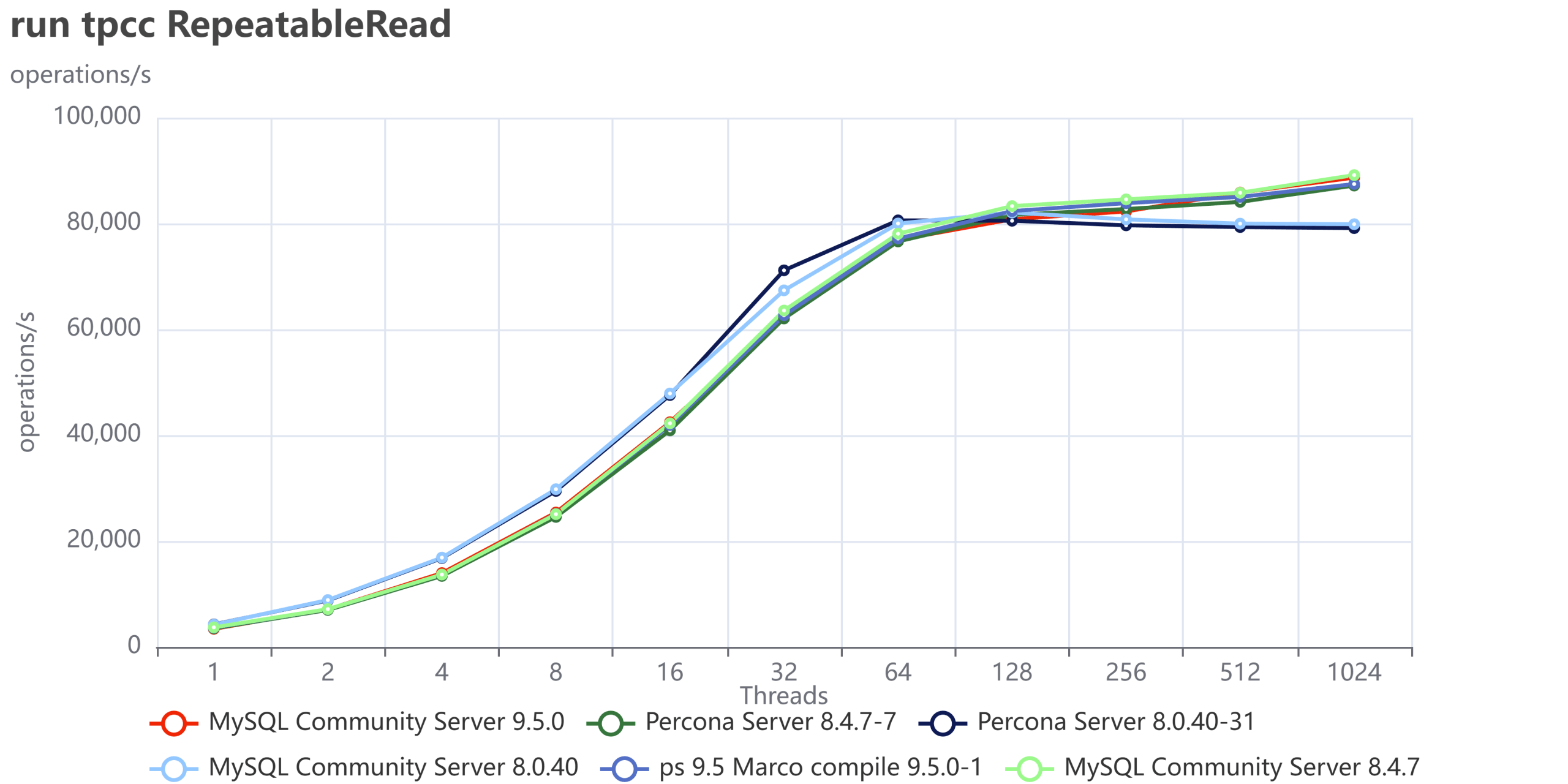
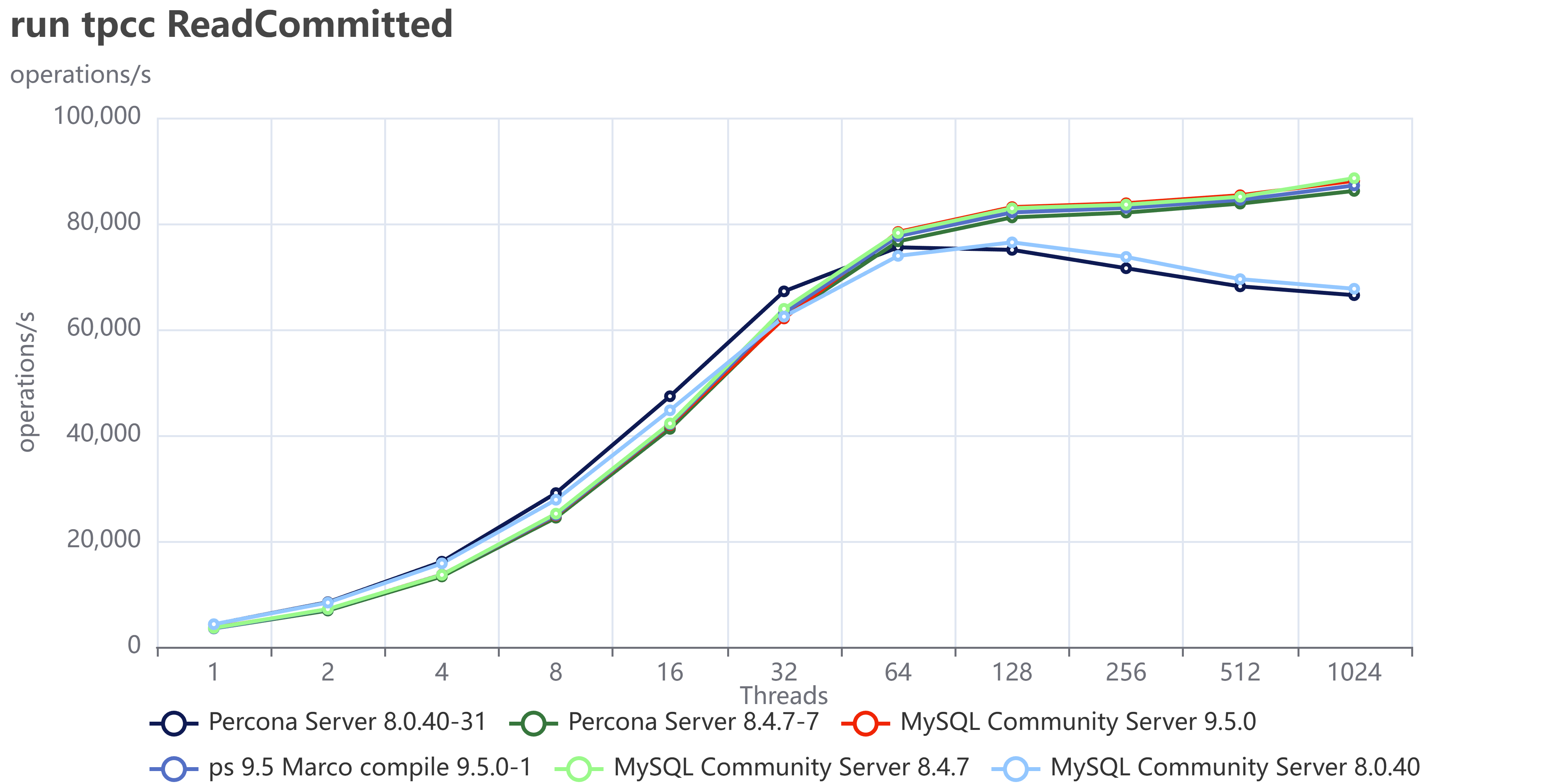
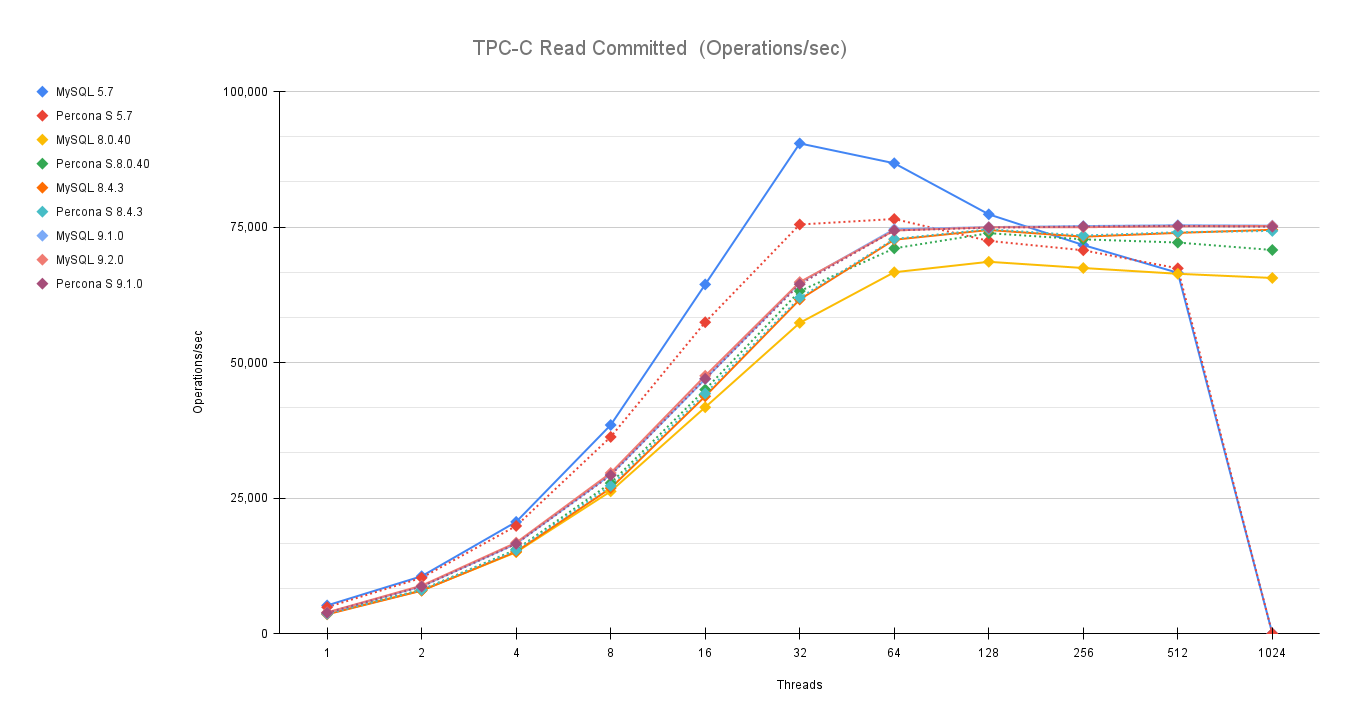
The tests done have two different kinds of isolation levels. Repeatable Read and Read Committed. The first is the default in MySQL/InnoDB, while the second is the default in many other very well known RDBMS. 


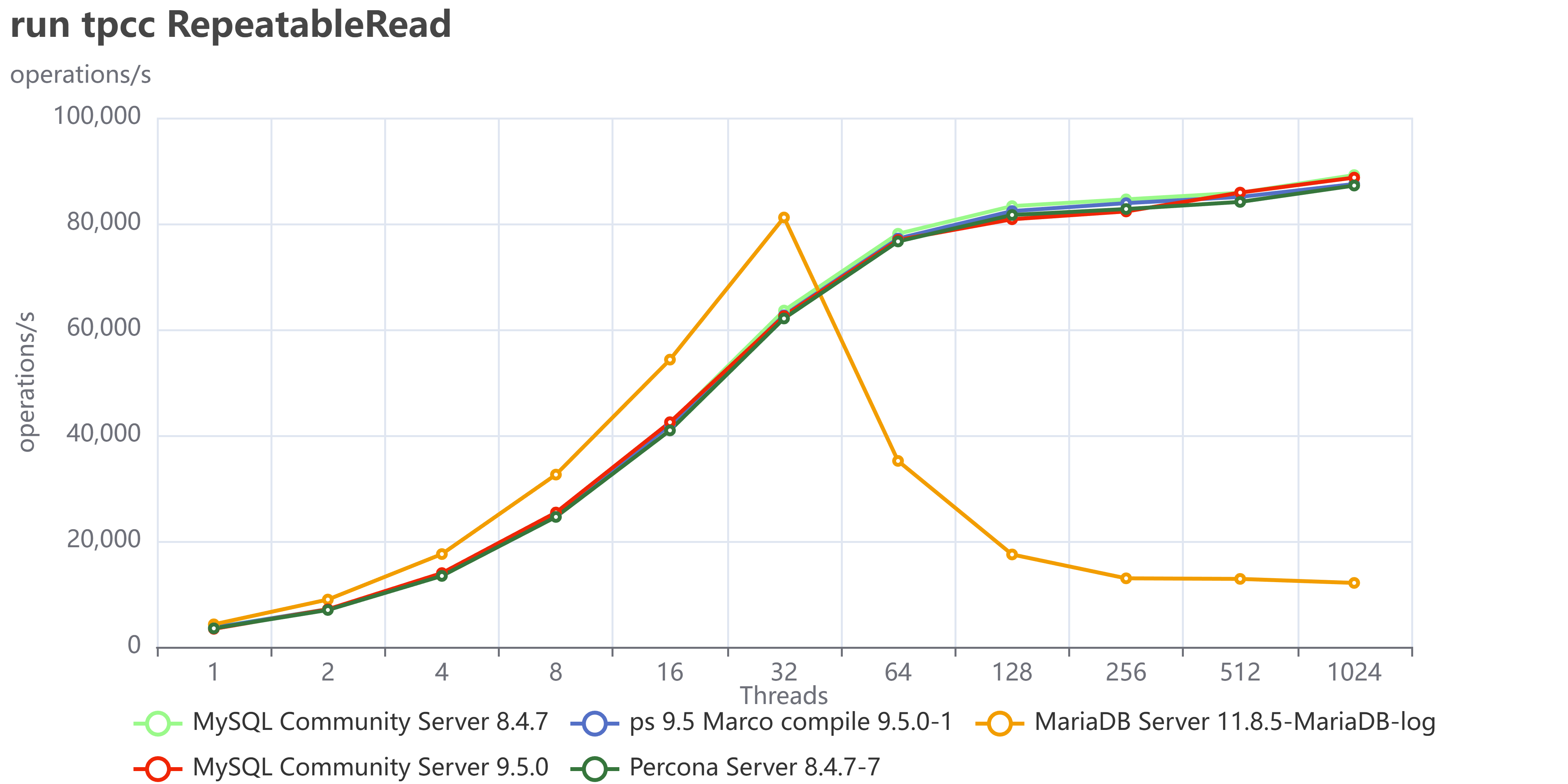
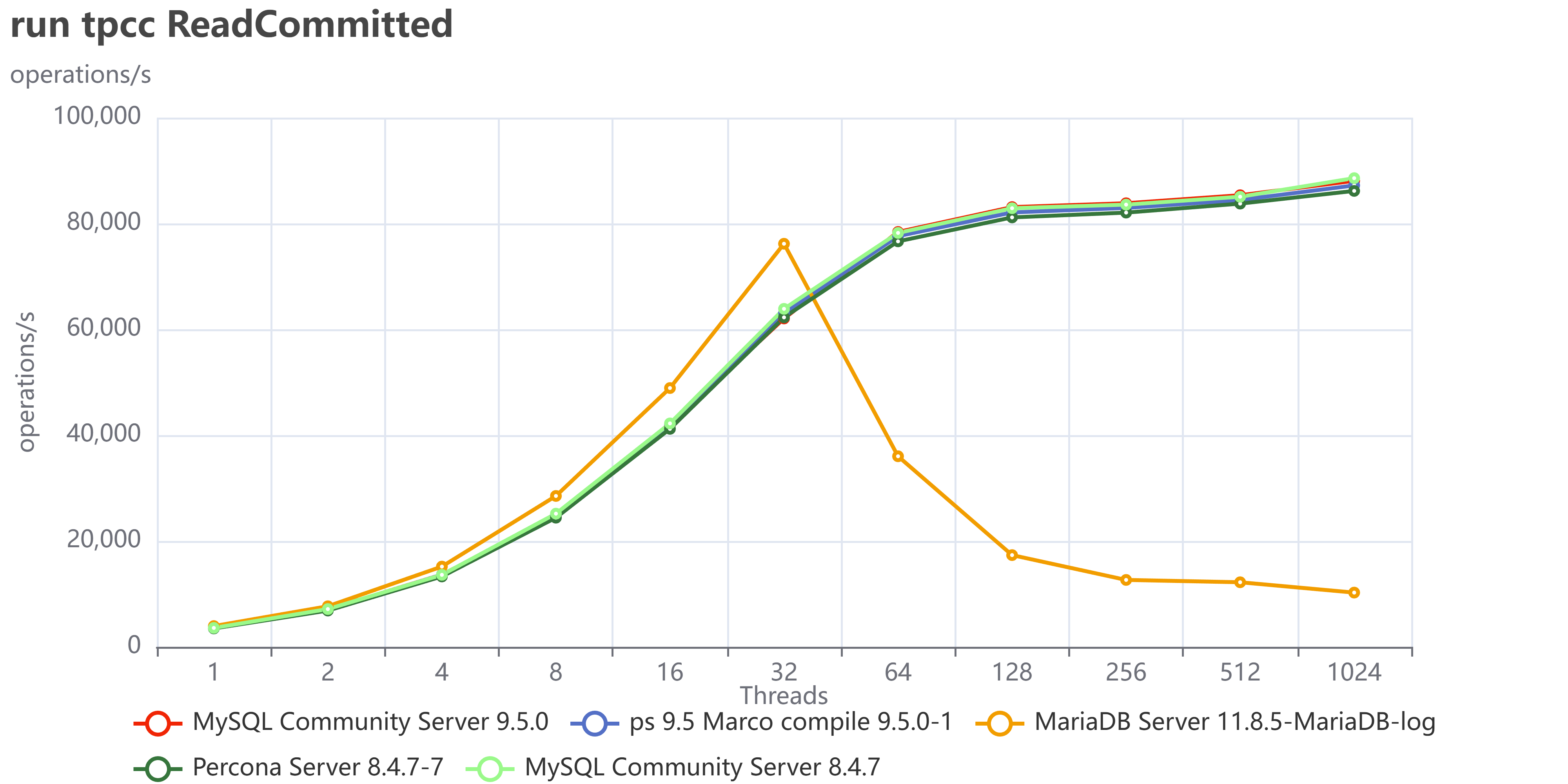
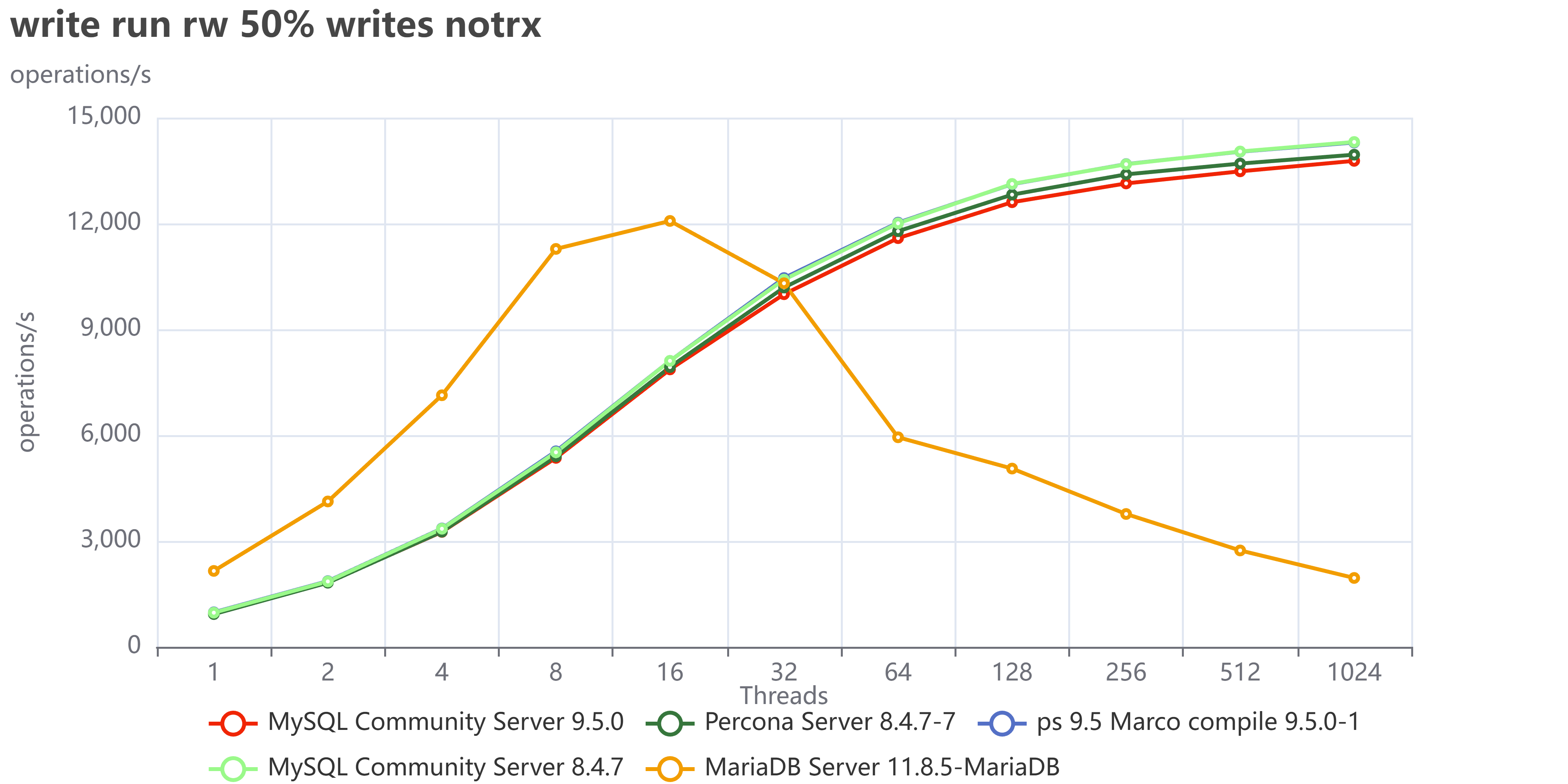
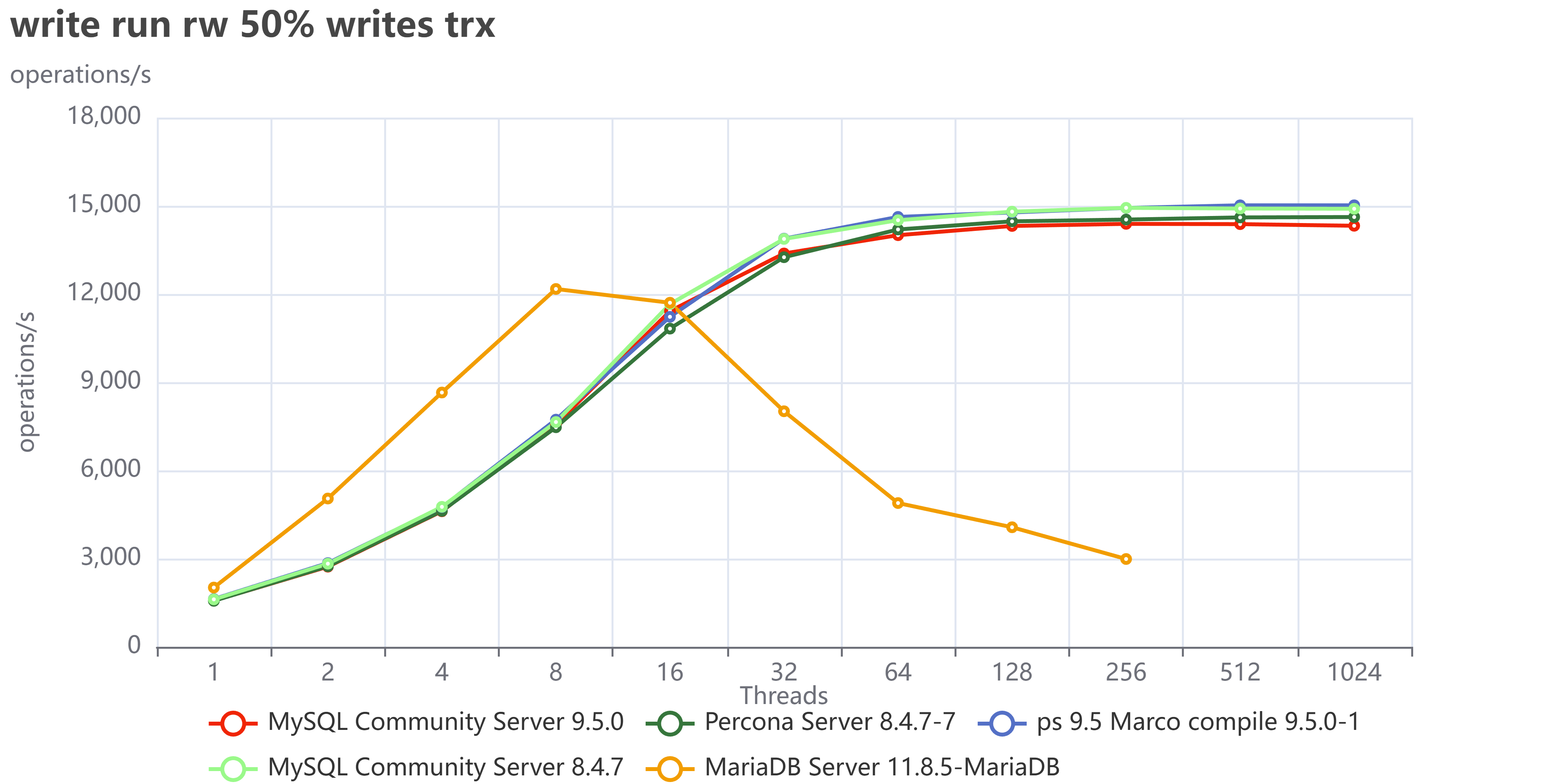
As usual an image is more descriptive than many words:

TPC C Read Committed Operations sec

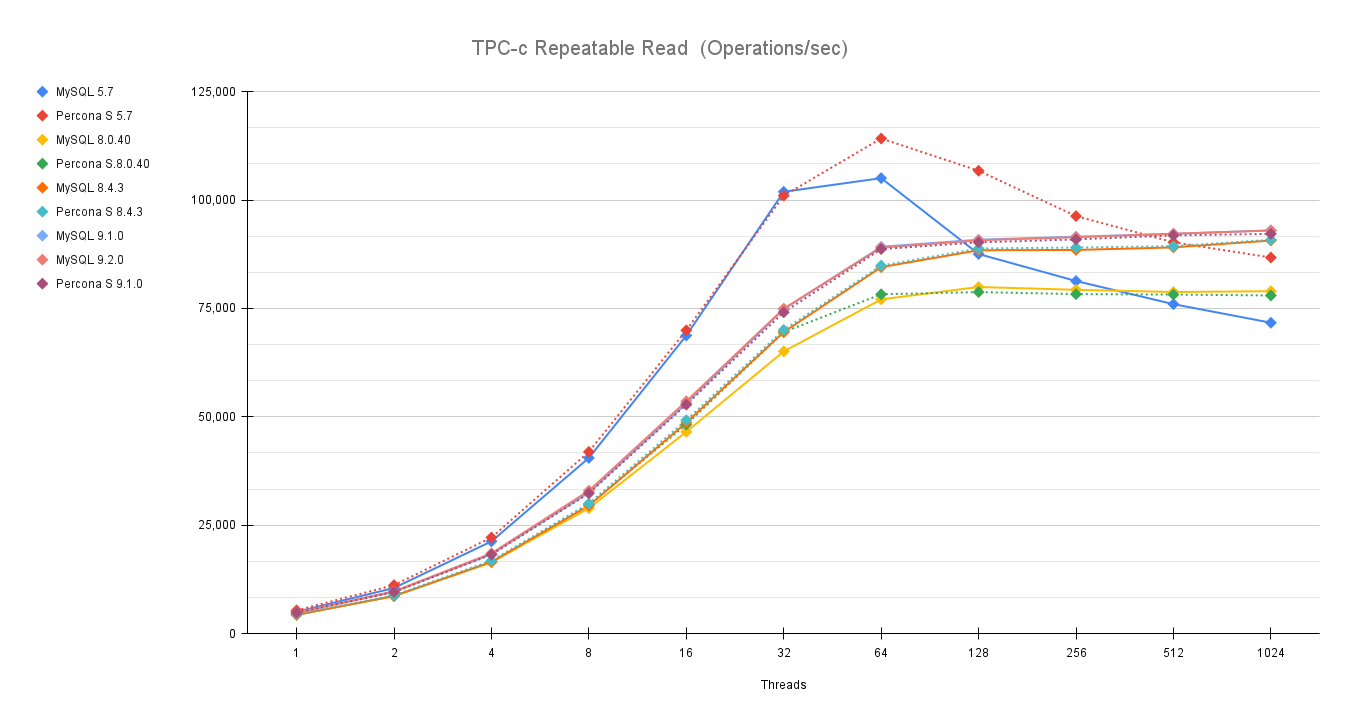
TPC c Repeatable Read Operations sec

You can also compare these trends (not the values) with the previous results published here.

Let us comment a bit on these images. 

The first comment we should make is that nowadays our systems must be ready to scale. Period, no discussion, also doing benchmarks up to 1024 threads is not enough. In reality we have 4000 or even more connections, given that doing benchmarking exercises and stopping the load at 128 threads or lower, makes no sense. Here it is quite clear that doing something like that could be very misleading. 

Old MySQL versions are still faster than newer with low level of concurrency, but they do not scale. So if I stop my tests at 64 or 128 threads I will conclude that MySQL 5.7 is always better than newer versions, while if I go on loading, I can see that old version performance drop after 64 concurrent threads. 


The second comment is that while in previous tests (see mentioned article) we saw that newer versions were not performing better or even consistently. With the latest releases MySQL had not only stabilized the server behaviour, but done significant fixes to the performance issues it had. 

If we remove the 5.7 version from the graphs we can see clearer what is going on:

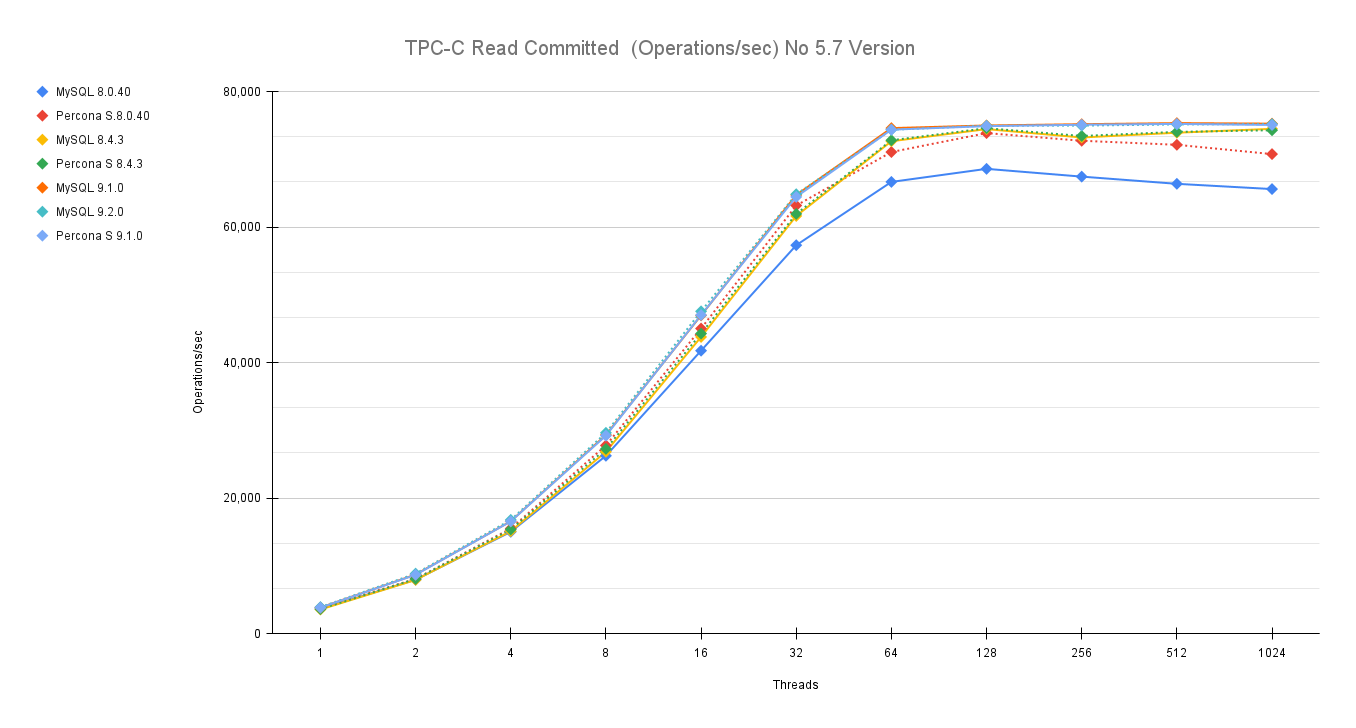
TPC C Read Committed Operations sec no57

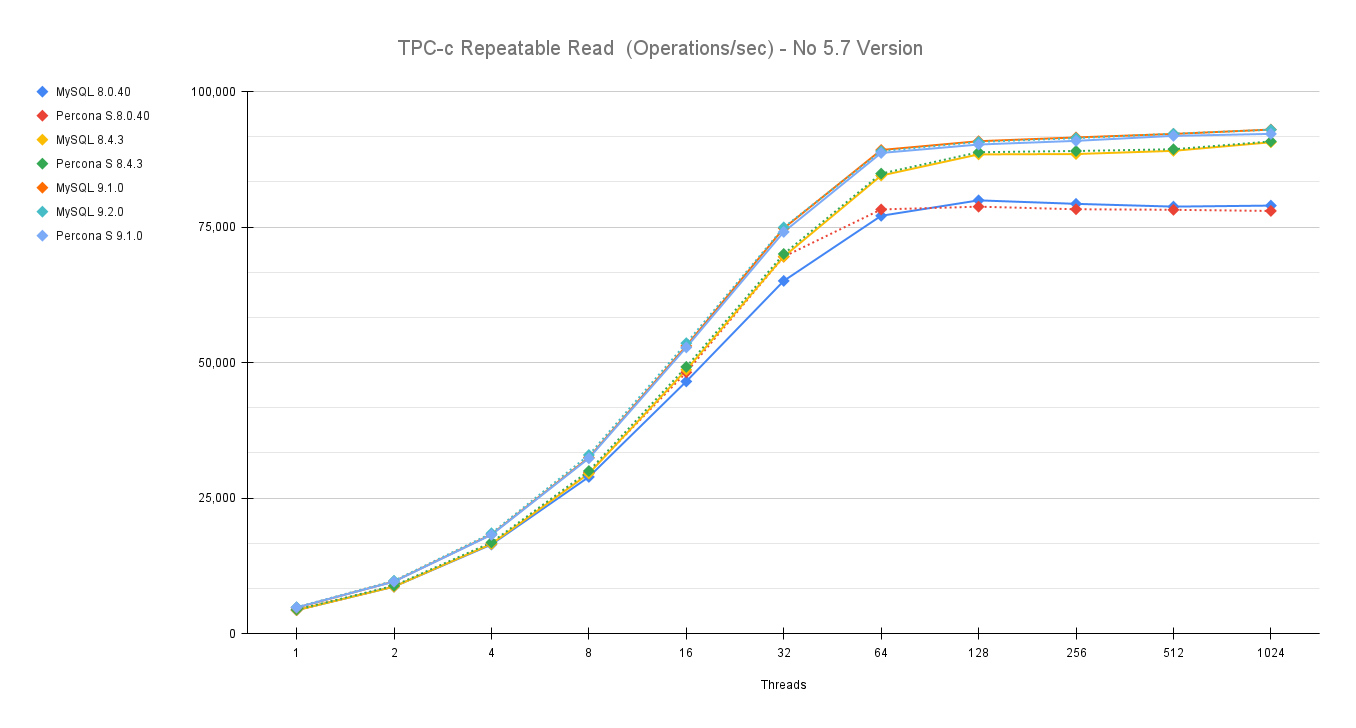
TPC c Repeatable Read Operations sec no57

If you notice the servers lines after 32 threads and especially after 64 threads diverge and we have two groups one see Percona and MySQL 8.0.40 in the lower set while Percona and MySQL 8.4 and 9.x are in the upper group. 

This is quite great news and very nice to see, because if I have to read it in a way I see a positive sign indicating how Oracle/MySQL is progressively resolving some performance issues and gaining ground again. 

Conclusions

The tests performed using TPC-C like tests confirms the initial finding of my colleague here, and give us a picture that is more positive of what we had. At the same time they indicate that the race to get better performance is open again, and I am intrigued to see what will come next.

For now we can say that MySQL 9.2 is the better performing MySQL version currently available, for its stability and scalability. 

Great job!  

No comments on “MySQL latest performance review”

How to migrate a production database to Percona Everest (MySQL) using Clone

Details
Marco Tusa
MySQL
02 September 2024

The aim of this long article is to give you the instructions and tools to migrate your production database, from your current environment to a solution based on Percona Everest (MySQL).

Nice, you decided to test Percona Everest, and you found that it is the tool you were looking for to manage your private DBaaS. For sure the easiest part will be to run new environments to get better understanding and experience on how the solution works. However, the day when you will look to migrate your existing environments will come. What should you do?

Prepare a plan! In which the first step is to understand your current environment. 

 When I say understand the current environment, I mean that you need to have a clear understanding of:

  • the current dimensions (CPU/Memory/Disk utilization)
  • the way it is accessed by the application, what kind of query you have, is Read or Write intensive, do you have pure OLTP or also some analytic, any ELT processing
  • the way it is used, constant load or by time of the day or by day of the year? Do you have any peak ie: Black Friday 
  • what is the RPO/RTO, do you need a Disaster Recovery site? 
  • Who is accessing your database, and why. 
  • What MySQL version are you using, is it compatible with Percona Everest MySQL versions? 

Once you have all the information, it is time to perform a quick review if the solution could fit or not, for this step, given its complexity, I suggest you contact Percona and get help from our experts to take the right decision.   

From the above process you should come with few clear indications such as:

  • Needed resources
  • It is more read, write or 50/50
  • The level of recovery I need

The first thing to do is to calculate the optimal configuration. For this you can help yourself with the mysqloperatorcalculator. The tool will give you the most relevant variables to set for MySQL, configuration that you will be able to pass to Percona Everest while creating the new cluster.  

To install Percona Everest see here

Create the new cluster

It is now time to open our Percona Everest console and start the adventure.

everest1 a

In the basic information step, look at the supported versions for Database Server

everest2 a

This version and the source version must match to safely use the CLONE plugin. Note that you cannot clone between MySQL 8.0 and MySQL 8.4 but can clone within a series such as MySQL 8.0.37 and MySQL 8.0.42. Before 8.0.37, the point release number also had to match, so cloning the likes of 8.0.36 to 8.0.42 or vice-versa is not permitted

It is now time to set the resources, the value of them should come from the analysis previously performed.

everest3 a

Given that choose 1 (one) node, then Custom and feel the fields as appropriate.

everest4 a

In advance configuration add the IP(s) you want to allow to access the cluster. You must add the IP of the source, IE 18.23.4.12/32.  

In the set database engine parameters add the values (for MySQL only) that the mysqloperatorcalculator is giving you. Do not forget to have the mysqld section declaration.

For example, in our case I need to calculate the needed values for a MySQL server with 4 CPU 8GB ram serving OLTP load, once you have the mysqloperatorcalculator tool running:

$ curl -i -X GET -H "Content-Type: application/json" -d '{"output":"human","dbtype":"pxc", "dimension":  {"id": 999, "cpu":4000,"memory":"8G"}, "loadtype":  {"id": 3}, "connections": 300,"mysqlversion":{"major":8,"minor":0,"patch":36}}' http://127.0.0.1:8080/calculator

You will get a set of values that after cleanup looks like:

[mysqld]
    binlog_cache_size = 262144
    binlog_expire_logs_seconds = 604800
    binlog_format = ROW
… snip …
    loose_wsrep_sync_wait = 3
    loose_wsrep_trx_fragment_size = 1048576
    loose_wsrep_trx_fragment_unit = bytes

Add the text in the TEXTAREA for the database parameters.

everest5 a

Enable monitoring if you like then click on Create database.

Once ready you will have something like this:

everest6

Or from shell

$ kubectl get pxc
NAME         ENDPOINT   STATUS   PXC   PROXYSQL   HAPROXY   AGE
test-prod1   xxx        ready    1                1         2m49s

$ kubectl get pods
NAME                                              READY   STATUS    RESTARTS   AGE
percona-xtradb-cluster-operator-fb4cf7f9d-97rfs   1/1     Running   0          13d
test-prod1-haproxy-0                              3/3     Running   0          106s
test-prod1-pxc-0                                  2/2     Running   0          69s

We are now ready to continue our journey.

Align the system users

This is a very important step. Percona Everest use the Percona Operator who will create a set of system users in the database, and these users must be present also in the source with the same level of GRANTS, otherwise after the clone phase is terminated, the system will not work correctly. 

Keep in mind Percona Everest will create the users with some generated password, these passwords may or may not fit your company rules or be simply too crazy. Do not worry you will be able to change them. For now, let's see what the system has generated. 

everest8

To see how to access the cluster click on the “^” top right, it will expand the section. User is “root” now unhide the password… Ok I don’t know you, but I do not like it at all. Let me change to the password I have already defined for root in the source. 

Percona Everest is not (yet) allowing you to modify the system users’ passwords from the GUI, but you can do it from command line:

DB_NAMESPACE=namespace'; 
DB_NAME='cluster-name'; 
USER='user'; 
PASSWORD='new-password'; 
kubectl patch secret everest-secrets-"$DB_NAME" -p="{"stringData":{"$USER": "$PASSWORD"}}" -n "$DB_NAMESPACE" 

Before changing let us check what password we have also for the other system users. 

About system users in Operator for MySQL (PXC based) we have the following:

  • root
  • operator
  • xtrabackup
  • monitor
  • replication

To get all of them use command line:

DB_NAMESPACE='namespace'; DB_NAME='cluster-name'; kubectl get secret everest-secrets-"$DB_NAME" -n "$DB_NAMESPACE" -o go-template='{{range $k,$v := .data}}{{"### "}}{{$k}}{{"| pw: "}}{{$v|base64decode}}{{"nn"}}{{end}}'|grep -E 'operator|replication|monitor|root||xtrabackup'
### monitor| pw: $&4fwdoYroBxFo#kQi
### operator| pw: NNfIUv+iL+J!,.Aqy94
### replication| pw: Rj89Ks)IVNQJH}Rd
### root| pw: f~A)Nws8wD<~%.j[
### xtrabackup| pw: h)Tb@ij*0=(?,?30

Now let me change my root user password:

$ DB_NAMESPACE='namespace'; DB_NAME='cluster-name'; USER='root'; PASSWORD='root_password'; kubectl patch secret everest-secrets-"$DB_NAME" -p="{"stringData":{"$USER": "$PASSWORD"}}" -n "$DB_NAMESPACE"

Now if I collapse and expand again (forcing a reload of the section):

everest9

My root user password is aligned with the one I pushed. 

As we have seen we have to decide what to do, so first thing is to check if our SOURCE has or not the users defined. If not, then it is easy we will just grab the users from the newly generated cluster and recreate them in the SOURCE.

To do so we will query the source database:

(root@localhost) [(none)]>select user,host,plugin from mysql.user order by 1,2;
+----------------------------+---------------+-----------------------+
| user                       | host          | plugin                |
+----------------------------+---------------+-----------------------+
| app_test                   | %             | mysql_native_password |
| dba                        | %             | mysql_native_password |
| dba                        | 127.0.0.1     | mysql_native_password |
| mysql.infoschema           | localhost     | caching_sha2_password |
| mysql.pxc.internal.session | localhost     | caching_sha2_password |
| mysql.pxc.sst.role         | localhost     | caching_sha2_password |
| mysql.session              | localhost     | caching_sha2_password |
| mysql.sys                  | localhost     | caching_sha2_password |
| operator                   | %             | caching_sha2_password |
| pmm                        | 127.0.0.1     | caching_sha2_password |
| pmm                        | localhost     | caching_sha2_password |
| replica                    | 3.120.188.222 | caching_sha2_password |
| root                       | localhost     | caching_sha2_password |
+----------------------------+---------------+-----------------------+

We are lucky and there is nothing really conflicting, so we can export and create the users inside the SOURCE. To do so you can use pt-show-grants:

pt-show-grants --host cluster-end-point --port 3306 --user dba --password dba --only 'monitor'@'%','xtrabackup'@'%',operator@'%',replication@'%',root@'%

This will generate an SQL output that you can run on the source. Please review it before running to be sure it will be safe for you to run it.

Once applied to source we will have:

+----------------------------+---------------+-----------------------+
| user                       | host          | plugin                |
+----------------------------+---------------+-----------------------+
| app_test                   | %             | mysql_native_password |
| dba                        | %             | mysql_native_password |
| dba                        | 127.0.0.1     | mysql_native_password |
| monitor                    | %             | caching_sha2_password |
| mysql.infoschema           | localhost     | caching_sha2_password |
| mysql.pxc.internal.session | localhost     | caching_sha2_password |
| mysql.pxc.sst.role         | localhost     | caching_sha2_password |
| mysql.session              | localhost     | caching_sha2_password |
| mysql.sys                  | localhost     | caching_sha2_password |
| operator                   | %             | caching_sha2_password |
| pmm                        | 127.0.0.1     | caching_sha2_password |
| pmm                        | localhost     | caching_sha2_password |
| replica                    | 3.120.188.222 | caching_sha2_password |
| replication                | %             | caching_sha2_password |
| root                       | %             | caching_sha2_password |
| root                       | localhost     | caching_sha2_password |
| xtrabackup                 | %             | caching_sha2_password |
+----------------------------+---------------+-----------------------+

The last step to do about the users, is to create a specific user to use for the migration. We will use it to perform the clone and after that we will remove it. 

On SOURCE:

create user migration@'%' identified by 'migration_password';
     grant backup_admin on *.* to migration@'%'

On RECEIVER (new cluster):

  create user migration@'%' identified by 'migration_password';
     GRANT SYSTEM_USER, REPLICATION SLAVE, CONNECTION_ADMIN, BACKUP_ADMIN, GROUP_REPLICATION_STREAM, CLONE_ADMIN,SHUTDOWN ON *.* to migration@'%';

Let us go CLONING 

First, is the CLONE plugin already there?

Discover this querying the two systems:

SELECT PLUGIN_NAME, PLUGIN_STATUS FROM INFORMATION_SCHEMA.PLUGINS  WHERE PLUGIN_NAME = 'clone';
SOURCE:
+-------------+---------------+
| PLUGIN_NAME | PLUGIN_STATUS |
+-------------+---------------+
| clone       | ACTIVE        |
+-------------+---------------+
RECEIVER:
mysql> SELECT PLUGIN_NAME, PLUGIN_STATUS FROM INFORMATION_SCHEMA.PLUGINS  WHERE PLUGIN_NAME = 'clone';
Empty set (0.42 sec)

RECEIVER doesn’t have the plugin active. Let us activate it:

INSTALL PLUGIN clone SONAME 'mysql_clone.so';

Warning!
If your source is behind a firewall, you need to allow the RECEIVER to connect, to get the IP of the RECEIVER just do:

kubectl -n namespace exec mysqlpodname -c pxc -- curl -4s ifconfig.me

This will return an IP, you need to add that IP to the firewall and allow the access. Keep this value aside, you will also need later to setup the asynchronous replication. 


Are we ready? Not really, there is a caveat here. If we clone with the Galera library active, the cloning will fail. 

To have it working we must:

  1. disable the wsrep provider
  2. stop operator probes to monitor the pod
  3. connect directly to the pod to run the operation and to monitor it. 

To do the above, on the receiver, we can:

  1. add wsrep_provider=none to the configuration
  2. as soon as the pod is up (monitor the log) issue from command line the command:
    kubectl -n namespace exec pod-name -c pxc -- touch /var/lib/mysql/sleep-forever
  3. Connect to the pod using:
    kubectl exec --stdin --tty <pod name> -n <namespace> -c pxc -- /bin/bash

During the time of the operations, the cluster will not be accessible from its end point and HAProxy pod will result down as well, all this is OK, don’t worry.

Let us go…

While monitoring the log and pod:

kubectl logs pod-name --follow -c pxc
kubectl get pods

everest10

Once you click continue and then edit database, the pod will be restarted.

Wait for the message in the log:

[MY-010931] [Server] /usr/sbin/mysqld: ready for connections. Version: '8.0.36-28.1'  socket: '/tmp/mysql.sock'  port: 3306  Percona XtraDB Cluster (GPL), Release rel28, Revision bfb687f, WSREP version 26.1.4.3.
2024-07-29T17:22:11.933714Z 0 [System] [MY-013292] [Server] Admin interface ready for connections, address: '10.1.68.172'  port: 33062

As soon as you see it, run the command to prevent Operator to restart the pod:

kubectl -n namespace exec pod-name -c pxc -- touch /var/lib/mysql/sleep-forever

Confirm file is there:

kubectl -n namespace exec pod-name -c pxc -- ls -l /var/lib/mysql|grep sleep

Checking the status you will have:

NAME                                              READY   STATUS    RESTARTS   AGE
percona-xtradb-cluster-operator-fb4cf7f9d-97rfs   1/1     Running   0          13d
test-prod1-haproxy-0                              2/3     Running   0          21h
test-prod1-pxc-0                                  1/2     Running   0          46s

Now you can connect to your pod only locally:

kubectl exec --stdin --tty <pod name> -n <namespace> -c pxc -- /bin/bash

Once there:

mysql -uroot -p<root_password>

And you are in.

I suggest you to open two different bash terminals and in one run the monitor query:

while [ 1 == 1 ]; do mysql -uroot -p<root_password> -e "select id,stage,state,BEGIN_TIME,END_TIME,THREADS,((ESTIMATE/1024)/1024) ESTIMATE_MB,format(((data/estimate)*100),2) 'completed%', ((DATA/1024)/1024) DATA_MB,NETWORK,DATA_SPEED,NETWORK_SPEED from performance_schema.clone_progress;";sleep 1;done;

This command will give you a clear idea of the status of the cloning process.

To clone from a SOURCE you need to tell the RECEIVER which source to trust.

On the other bash, inside the mysql client:

SET GLOBAL clone_valid_donor_list = 'source_public_ip:port';
CLONE INSTANCE FROM 'migration'@'ip':port IDENTIFIED BY 'XXX';

While cloning your monitor query will give you the status of the operation:

+------+-----------+-------------+----------------------------+----------------------------+---------+-----------------+------------+---------------+------------+------------+---------------+
| id   | stage     | state       | BEGIN_TIME                 | END_TIME                   | THREADS | ESTIMATE_MB     | completed% | DATA_MB       | NETWORK    | DATA_SPEED | NETWORK_SPEED |
+------+-----------+-------------+----------------------------+----------------------------+---------+-----------------+------------+---------------+------------+------------+---------------+
|    1 | DROP DATA | Completed   | 2024-07-30 15:07:17.690966 | 2024-07-30 15:07:17.806309 |       1 |      0.00000000 | NULL       |    0.00000000 |          0 |          0 |             0 |
|    1 | FILE COPY | In Progress | 2024-07-30 15:07:17.806384 | NULL                       |       4 | 130692.40951157 | 3.55       | 4642.11263657 | 4867879397 |  491961485 |     491987808 |
|    1 | PAGE COPY | Not Started | NULL                       | NULL                       |       0 |      0.00000000 | NULL       |    0.00000000 |          0 |          0 |             0 |
|    1 | REDO COPY | Not Started | NULL                       | NULL                       |       0 |      0.00000000 | NULL       |    0.00000000 |          0 |          0 |             0 |
|    1 | FILE SYNC | Not Started | NULL                       | NULL                       |       0 |      0.00000000 | NULL       |    0.00000000 |          0 |          0 |             0 |
|    1 | RESTART   | Not Started | NULL                       | NULL                       |       0 |      0.00000000 | NULL       |    0.00000000 |          0 |          0 |             0 |
|    1 | RECOVERY  | Not Started | NULL                       | NULL                       |       0 |      0.00000000 | NULL       |    0.00000000 |          0 |          0 |             0 |
+------+-----------+-------------+----------------------------+----------------------------+---------+-----------------+------------+---------------+------------+------------+---------------+

When the process is completed, the mysqld will shut down.

Checking in the log you will see something like this:

The /var/lib/mysql/sleep-forever file is detected, node is going to infinity loop
If you want to exit from infinity loop you need to remove /var/lib/mysql/sleep-forever file

Do not worry all is good!

At this point we want to have MySQL start again and validate the current files:

kubectl -n namespace exec podname -c pxc – mysqld &

Check the log and if all is ok, connect to mysql using local client:

kubectl exec --stdin --tty <pod name> -n <namespace> -c pxc -- /bin/bash
mysql -uroot -p<password>

Issue shutdown command from inside.

It is time to remove the wsrep_provider=none and after the sleep-forever file.

Go to the Percona Everest GUI and remove from the Database Parameters wsrep_provider=none click continue and then edit database.

Final step, remove the file:

kubectl -n namespace exec podname -c pxc -- rm -f /var/lib/mysql/sleep-forever

Cluster will come back (after few restarts) with the new dataset and pointed to the SOURCE GTID:

mysql> select @@gtid_executed;
+-----------------------------------------------+
| @@gtid_executed                               |
+-----------------------------------------------+
| aeb22c03-7f13-11ee-9ff6-0224c88bdc4c:1-698687 |
+-----------------------------------------------+

Enable Replication

Now if you are used to Percona Operator for MySQL (PXC based) you probably know that it does support remote asynchronous replication. This feature is available in the operator used by Everest but it is not exposed yet.
The benefit of using the “native” replication is that the replication will be managed by the operator in case of pod crash. This will allow the cluster to continue to replicate cross pods. 

On the other hand, the method described below, which for the moment (Percona Everest v1.0.1) is the only applicable, require manual intervention to start the replication in case of pod failure. 

Clarified that, here are the steps you need to follow to enable replication between the new environment and your current production. 

On source:

CREATE USER <replicauser>@'3.120.188.222' IDENTIFIED BY '<replicapw>';
GRANT REPLICATION SLAVE ON *.* TO replica@'<replica_external_ip>';

The IP of replica_external_ip is the one I told you to keep aside, for convenience here the command to get it again:

kubectl -n namespace exec podname -c pxc -- curl -4s ifconfig.me

On Receiver, connect to the pod using mysql client and type:

CHANGE REPLICATION SOURCE TO SOURCE_HOST='<source>', SOURCE_USER=<replicauser>, SOURCE_PORT=3306, SOURCE_PASSWORD='<replicapw>', SOURCE_AUTO_POSITION = 1

Then start replication as usual.

If all was done right, you will have the Replication working and your new database is replicating from current production, keeping the two in sync.

mysql> show replica statusG
*************************** 1. row ***************************
             Replica_IO_State: Waiting for source to send event
                  Source_Host: 18.198.187.64
                  Source_User: replica
                  Source_Port: 3307
                Connect_Retry: 60
              Source_Log_File: binlog.000001
          Read_Source_Log_Pos: 337467656
               Relay_Log_File: test-prod1-pxc-0-relay-bin.000002
                Relay_Log_Pos: 411
        Relay_Source_Log_File: binlog.000001
           Replica_IO_Running: Yes
          Replica_SQL_Running: Yes
… snip …
            Executed_Gtid_Set: aeb22c03-7f13-11ee-9ff6-0224c88bdc4c:1-698687
                Auto_Position: 1
         Replicate_Rewrite_DB: 
                 Channel_Name: 
           Source_TLS_Version: 
       Source_public_key_path: 
        Get_Source_public_key: 0
            Network_Namespace:

Final touch

The final touch is to move the cluster from 1 node to 3 nodes.

$ kubectl get pods
NAME                                              READY   STATUS    RESTARTS      AGE
percona-xtradb-cluster-operator-fb4cf7f9d-97rfs   1/1     Running   0             14d
test-prod1-haproxy-0                              2/2     Running   6 (48m ago)   77m
test-prod1-pxc-0                                  1/1     Running   0             45m

To do so, open the Percona Everest GUI, edit your database and in the Resources tab, choose 3 nodes, then continue till the end and edit database.

everest11 a

At the end of the update process, you will have:

$ kubectl get pods
NAME                                              READY   STATUS    RESTARTS       AGE
percona-xtradb-cluster-operator-fb4cf7f9d-97rfs   1/1     Running   0              14d
test-prod1-haproxy-0                              2/2     Running   6 (151m ago)   3h1m
test-prod1-haproxy-1                              2/2     Running   0              103m
test-prod1-haproxy-2                              2/2     Running   0              102m
test-prod1-pxc-0                                  1/1     Running   0              149m
test-prod1-pxc-1                                  1/1     Running   0              103m
test-prod1-pxc-2                                  1/1     Running   0              93m

At this point you have your new environment ready to go.

Post migration actions

Remember that there are always many other things to do once you have migrated the data:

  • Validate Data Integrity
    • Consistency Check: Use tools like mysqlcheck or Percona’s pt-table-checksum to ensure data integrity and consistency between MySQL 8.0 and Percona Everest.
    • Query Testing: Run critical queries and perform load testing to ensure that performance metrics are met and that queries execute correctly.
  • Test and Optimize
    • Benchmarking: Conduct performance benchmarking to compare MySQL 8.0 and Percona Everest. Use tools like sysbench or MySQL’s EXPLAIN statement to analyze query performance.
    • Optimization: Tweak Percona Everest settings based on the benchmark results. Consider features like Percona’s Query Analytics and Performance Schema for deeper insights.
  • Enable Backup schedule and Point In time Recovery
    everest12 a
  • Switch to Production
    • Cutover Plan: Develop a cutover plan that includes a maintenance window, final data synchronization, and the switchover to the new database.
    • ALWAYS perform a backup of the platform.
    • Monitoring and Support: Set up monitoring with tools like Percona Monitoring and Management (PMM) to keep an eye on performance, queries, and server health.
  • Verification and Documentation:
    • Data Validation: Conduct thorough testing to confirm that all application functionality works as expected with Percona Everest.
    • Documentation: Update your database documentation to reflect the new setup, configurations, and any changes made during the migration.

Summary of commands 

Use Command
Get cluster state kubectl get pxc
Get list of the pods kubectl get pods
Return password for system users DB_NAMESPACE='namespace'; DB_NAME='cluster-name'; kubectl get secret everest-secrets-"$DB_NAME" -n "$DB_NAMESPACE" -o go-template='{{range $k,$v := .data}}{{"### "}}{{$k}}{{"| pw: "}}{{$v|base64decode}}{{"nn"}}{{end}}'|grep -E 'operator|replication|monitor|root||xtrabackup'
Change password for a given user DB_NAMESPACE='namespace'; DB_NAME='cluster-name'; USER='root'; PASSWORD='root_password'; kubectl patch secret everest-secrets-"$DB_NAME" -p="{"stringData":{"$USER": "$PASSWORD"}}" -n "$DB_NAMESPACE
Show the pod log for a specific container Tail style kubectl logs pod-name --follow -c pxc
Return public IP for that pod kubectl -n namespace exec podname -c pxc -- curl -4s ifconfig.me
Prevent operator to restart the pod kubectl -n namespace exec pod-name -c pxc -- touch /var/lib/mysql/sleep-forever
Remove the sleep-forever file kubectl -n namespace exec pod-name -c pxc – rm -f /var/lib/mysql/sleep-forever
Connect to pod bash kubectl exec --stdin --tty <pod name> -n <namespace> -c pxc -- /bin/bash
   

References

https://www.percona.com/blog/understanding-what-kubernetes-is-used-for-the-key-to-cloud-native-efficiency/

https://www.percona.com/blog/should-you-deploy-your-databases-on-kubernetes-and-what-makes-statefulset-worthwhile/

https://www.tusacentral.com/joomla/index.php/mysql-blogs/242-compare-percona-distribution-for-mysql-operator-vs-aws-aurora-and-standard-rds

https://www.tusacentral.com/joomla/index.php/mysql-blogs/243-mysql-on-kubernetes-demystified

https://github.com/Tusamarco/mysqloperatorcalculator

https://www.percona.com/blog/migration-of-a-mysql-database-to-a-kubernetes-cluster-using-asynchronous-replication/


No comments on “How to migrate a production database to Percona Everest (MySQL) using Clone”

Sakila, Where Are You Going?

Details
Marco Tusa
MySQL
18 June 2024

This article is in large part the same of what I have published in the Percona blog. However I am reproposing it here given it is the first some other benchmarking exercise that I am probably going to present here in an extended format, while it may be more concise in other platforms. 

In any case why this tests. 

I am curious, and I do not like (at all) what is happening around MySQL and MariaDB, never like it, but now is really think is time to end this negative trend, that is killing not only the community, but the products as well. 

The tests

Assumptions

There are many ways to run tests, and we know that results may vary depending on how you play with many factors, like the environment or the MySQL server settings. However, if we compare several versions of the same product on the same platform, it is logical to assume that all the versions will have the same “chance” to behave well or badly unless we change the MySQL server settings. 

Because of this, I ran the tests ON DEFAULTS, with the clear assumption that if you release your product based on the defaults, that implies you had tested with them and consider them the safest for generic use. 

I also applied some modifications and ran the tests again to see how optimization would impact performance. 

What tests do we run?

High level, we run two sets of tests:

  • Sysbench
  • TPC-C (https://www.tpc.org/tpcc/) like 

The full methodology and test details can be found here, while actual commands are available:

  • Sysbench
  • TPC-C 

Results

While I have executed the whole set of tests as indicated on the page, and all the results are visible here, for brevity and because I want to keep this article at a high level, I will report and cover only the Read-Write tests and the TPC-C. 

This is because, in my opinion, they offer an immediate and global view of how the server behaves. They also represent the most used scenario, while the other tests are more interesting to dig into problems.   

The sysbench read/write tests reported below have a lower percentage of writes ~36% and ~64% reads, where reads are point selects and range selects. TPC-C instead has an even distribution of 50/50 % between read and write operations. 

Sysbench read and write tests 

Test using default configurations only MySQL in different versions. 

Small dataset:

mysql trend default rw small

Optimized configuration only MySQL:

mysql trend optimized rw small 100 range

Large dataset using defaults:

mysql trend default rw large 100 range

Using optimization:

mysql trend optimized rw large 100 range

The first two graphs are interesting for several reasons, but one that jumps out is that we cannot count on DEFAULTS as a starting point. Or, to be correct, we can use them as the base from which we must identify better defaults; this is also corroborated by Oracle's recent decision to modify many defaults in 8.4 (see article). 

Given that I will focus on the results obtained with the optimized configs.

Now looking at the graphs above, we can see that:

  1. MySQL 5.7 is performing better in both cases just using defaults.
  2. Given bad defaults, MySQL 8.036 was not performing well in the first case; just making some adjustments allowed it to over-perform 8.4 and be closer to what 5.7 can do.

TPC-C tests

As indicated, TPC-C tests are supposed to be write-intensive, using transactions and more complex queries with join, grouping, and sorting.

I was testing the TPC-C using the most common isolation modes, Repeatable Reads, and Read Committed.

While we experienced several issues during the multiple runs, those were not consistent, mainly due to locking timeouts. Given that, while I am representing the issue presence with a blank in the graph, they are not to be considered to impact the execution trend but only represent a saturation limit. 

Test using optimized configurations:

tpcc RepeatableRead with defaults only mysql

Test using optimized configurations:

tpcc ReadCommitted with optimized only mysql

In this test we can observe that MySQL 5.7 is better performing in comparison with the other MySQL versions.  

What if we compare it with Percona Server for MySQL and MariaDB?

I will present only the optimized tests here for brevity because, as I saw before, we know defaults are not serving us well. 

mysql versions compare optimized rw small 100 range

mysql versions compare optimized rw large 100 range

When comparing the MYSQL versions against Percona Server for MySQL 8.0.36 and MariaDB 11.3, we see how MySQL 8.4 is doing better only in relation to MariaDB; after that, it remains behind also compared to MySQL 8.0.36. 

TPC-C

tpcc RepeatableRead optimized all

tpcc ReadCommitted optimized all

As expected, MySQL 8.4 is not acting well here either, and only MariaDB is performing worse. Note how Percona Server for MySQL 8.0.36 is the only one able to handle the increased contention. 

What are these tests saying to us?

Frankly speaking, what we get here is what most of our users get as well, but on their own skin. MySQL performances are degrading with the increase of versions. 

For sure, MySQL 8.x comes with interesting additions; however, if you consider performance as the first and most important topic, then MySQL 8.x is not any better. 

Having said this, we must say that probably most of the ones still using MySQL 5.7 (and we have thousands of them) are right. Why embark on a very risky migration and then discover that you have lost a considerable percentage in performance?  

Regarding this, if we analyze the data and convert the trends into transactions/sec, we can identify the following scenarios if we compare the tests done using TPC:

tpcc trx lost rr

tpcc trx lost pct rc

As we can see, the performance degradation can be significant in both tests, while the benefits (when present) are irrelevant. 

In absolute numbers:

tpcc trx lost rr

tpcc trx lost rc


In this scenario, we need to ask ourselves, can my business deal with such a performance drop?

Considerations

When MySQL was sold to SUN Microsystems, I was in MySQL AB. I was not happy about that move at all, and when Oracle took over SUN, I was really concerned about Oracle's possible decision to kill MySQL. I also decided to move on and join another company. 

In the years after, I changed my mind, and I was supporting and promoting the Oracle/MySQL work. In many ways, I still am. 

They did a great job rationalizing the development, and the code clean-up was significant. However, something did not progress with the rest of the code. The performance decrease we are seeing is the cost of this lack of progress; see also Peter's article Is Oracle Finally Killing MySQL?.

On the other hand, we need to recognize that Oracle is investing a lot in performance and functionalities when we talk of the OCI/MySQL/Heatwave offer. Only those improvements are not reflected in the MySQL code, no matter if it is Community or Enterprise. 

Once more, while I consider this extremely sad, I can also understand why. 

Why should Oracle continue to optimize the MySQL code for free when cloud providers such as Google or AWS use that code, optimize it for their use, make billions, and not even share the code back? 

We know this has been happening for many years now, and we know this is causing a significant and negative impact on the open source ecosystem. 

MySQL is just another Lego block in a larger scenario in which cloud companies are cannibalizing the work of others for their own economic return. 

What can be done? I can only hope we will see a different behavior soon. Opening the code and investing in projects that will help communities such as MySQL to quickly recover the lost ground. 

Let me add that while is perfectly normal in our economy to look for profit, at the end this is what capitalism is for, it is not normal, or for better say it is negative, to look for profit without keeping in mind you are burning out the resources. that gives you that profit. 

This last is consumerism, using and abusing, without keeping in mind you MUST give the resources you use the time/energy/opportunity to renew and florish is stupid, short sight and suicidal.

Perfectly in line with our times isen't it?   

So let say that many big names in the cloud, should seriously rethink what they are doing, not because they need to be nice. But because they will get better outcome and income helping the many opensource community instead as they are doing today, abusing them. 

In the meantime, we must acknowledge that many customers/users are on 5.7 for a good reason and that until we are able to fix that, they may decide not to migrate forever or, if they must, to migrate to something else, such as Postgres. 

Then Sakila will slowly and painfully die as usual for the greed of the human being, nothing new in a way, yes, but not good.

dolphin heatwave3

Happy MySQL to all.  


No comments on “Sakila, Where Are You Going?”

Is MySQL Router 8.2 Any Better?

Details
Marco Tusa
MySQL
11 January 2024

In my previous article, Comparisons of Proxies for MySQL, I showed how MySQL Router was the lesser performing Proxy in the comparison. From that time to now, we had several MySQL releases and, of course, also some new MySQL Router ones.

Most importantly, we also had MySQL Router going back to being a level 7 proxy capable of redirecting traffic in case of R/W operations (see this).

All these bring me hope that we will also have some good improvements in what is a basic functionality in a router: routing.

So with these great expectations, I had to repeat the exact same tests I did in my previous tests, plus I tested for MySQL Router only the cost of encapsulating the select inside a transaction.

Just keep in mind that for all the tests, MySQL Router was configured to use the read/write split option.

The results

Given this is the continuation of the previous blog, all the explanations about the tests and commands used are in the first article. If you did not read that, do it now, or it will be difficult for you to follow what is explained later.

As indicated, I was looking to identify when the first proxy would reach a dimension that would not be manageable. The load is all in creating and serving the connections, while the number of operations is capped at 100.

As you can see, MySQL Router was reaching the saturation level and was unable to serve traffic at exactly the same time as the previous test.

Test two

When the going gets tough, the tough get going reprise ;) 

Let’s remove the –rate limitation and see what will happen. First, let us compare MySQL router versions only:

router 82 80 comparison events

As we can see the MySQL Router version 8.2 is doing better up to 64 concurrent threads.

Latency follows the same trend in old and new cases, and we can see that the new version is acting better, up to 1024 threads.

Is this enough to cover the gap with the other proxies? Which, in the end, is what we would like to see. 

events norate 82

latency norate 82

Well, I would say not really; we see a bit of better performance with low concurrent threads, but still not scaling and definitely lower than the other two.

Now let us take a look at the CPU saturation:

cpu saturation

cpu

Here, we can see how MySQL Router hits the top as soon as the rate option is lifted and gets worse with the increase of the running threads.

Test three

This simple test was meant to identify the cost of a transaction, or better, what it will cost to include selects inside a transaction.

read events trx

latency events trx

As we can clearly see, MySQL Router, when handling selects inside a transaction, will drop its performance drastically going back to version 8.0 performance.

Conclusions

To the initial question — Is MySQL Router 8.2 any better? — we can answer a small (very small) yes.

However, it is still far, far away from being competitive with ProxySQL (same proxy level) or with HAProxy. The fact it is not able to serve efficiently the requests also inside the lower set of concurrent threads, is disappointing.

Even more disappointing because MySQL Router is presented as a critical component in the MySQL InnoDB Cluster solution. How can we use it in the architectures if the product has such limitations?

I know that Oracle suggests to scale out, and I agree with them. When in need to scale with MySQL Router, the only option is to build a forest. However, we must keep in mind that each MySQL Router connects and queries the data nodes constantly and intensively. Given that it requires adding a forest of router nodes to scale, it is not without performance impact, given the increasing noise generated on the data nodes.

Anyhow also, if there is a theoretical option to scale, that is not a good reason to use a poor performing component.

I would prefer to use ProxySQL with Group Replication and add whatever script is needed in mysqlshell to manage it as Oracle is doing for the MySQL InnoDB cluster solution.

What also left me very unhappy is that MySQL InnoDB Cluster is one of the important components of the OCI offer for MySQL. Is Oracle using MySQL Router there as well? I assume so. Can we trust it? I am not feeling like I can.

Finally, what has been done for MySQL Router so far leads me to think that there is no real interest in making it the more robust and performing product that MySQL InnoDB Cluster deserves.

I hope I am wrong and that we will soon see a fully refactored version of MySQL Router. I really hope Oracle will prove me wrong.

Great MySQL to everyone.

No comments on “Is MySQL Router 8.2 Any Better?”

Export and import of MySQL passwords using caching_sha2 

Details
Marco Tusa
MySQL
25 September 2023

Some fun is coming

While I was writing the internal guidelines on how to migrate from MariaDB to Percona Server, I had to export the users accounts in a portable way. This given MariaDB uses  some non standard syntax brings me to first test some external tools such as Fred https://github.com/lefred/mysqlshell-plugins/wiki/user#getusersgrants and our PT-SHOW-GRANTS tool. 

Useless to say this had open a can worms, given first I had to fix/convert the specifics for MariaDB (not in the scope of this blog), then while testing I discover another nasty issue, that currently prevent us to easily export the new Passwords in MySQL 8 (and PS 8) when caching_sha2 is used. 


So what is the problem I am referring to?

Well the point is that when you generate passwords with caching_sha2 (default in mysql 8) the password generated can (will) contain characters that are not portable, not even between mysql 8. 

Let's see a practical example to understand.

If I use old mysql_native_password and I create a user such as:

create user dba@'192.168.1.%' identified with mysql_native_password by 'dba'; 

My authentication_string will be: 

root@localhost) [(none)]>select user,host,authentication_string,plugin from mysql.user where user ='dba' order by 1,2;
+------+-------------+-------------------------------------------+-----------------------+
| user | host        | authentication_string                     | plugin                |
+------+-------------+-------------------------------------------+-----------------------+
| dba  | 192.168.1.% | *381AD08BBFA647B14C82AC1094A29AD4D7E4F51D | mysql_native_password |
+------+-------------+-------------------------------------------+-----------------------+

At this point if you want to export the user:

(root@localhost) [(none)]>show create user dba@'192.168.1.%'G
*************************** 1. row ***************************
CREATE USER for This email address is being protected from spambots. You need JavaScript enabled to view it..1.%: CREATE USER `dba`@`192.168.1.%` IDENTIFIED WITH 'mysql_native_password' AS '*381AD08BBFA647B14C82AC1094A29AD4D7E4F51D' REQUIRE NONE PASSWORD EXPIRE DEFAULT ACCOUNT UNLOCK PASSWORD HISTORY DEFAULT PASSWORD REUSE INTERVAL DEFAULT PASSWORD REQUIRE CURRENT DEFAULT
1 row in set (0.01 sec)

You just need to use the text after the semicolon and all will work fine. Remember that when you want to preserve the already converted password you need to use the IDENTIFIED … AS <PW> not the BY or you will re-convert the password ;).

 Anyhow .. this is simple and what we are all used to. 

Now if you instead try to use caching_sha2 things will go differently:

root@localhost) [(none)]>create user dba@'192.168.4.%' identified with caching_sha2_password by 'dba';
Query OK, 0 rows affected (0.02 sec)

(root@localhost) [(none)]>select user,host,authentication_string,plugin from mysql.user where user ='dba' order by 1,2;
+------+-------------+------------------------------------------------------------------------+-----------------------+
| user | host        | authentication_string                                                  | plugin                |
+------+-------------+------------------------------------------------------------------------+-----------------------+
| dba  | 192.168.1.% | *381AD08BBFA647B14C82AC1094A29AD4D7E4F51D                              | mysql_native_password |
| dba  | 192.168.4.% | $A$005$@&%1H5iNQx|.l{N7T/GosA.Lp4EiO0bxLVQp8Zi0WY2nXLr8TkleQPYjaqVxI7 | caching_sha2_password |
+------+-------------+------------------------------------------------------------------------+-----------------------+
2 rows in set (0.00 sec)

Probably you will not see it here given that while converted on your screen the special characters will be replaced, but the password contains invalid characters. 

If I try to extract the Create USER text I will get:

 (root@localhost) [(none)]>show create user dba@'192.168.4.%'G
*************************** 1. row ***************************
CREATE USER for This email address is being protected from spambots. You need JavaScript enabled to view it..4.%: CREATE USER `dba`@`192.168.4.%` IDENTIFIED WITH 'caching_sha2_password' AS '$A$005$@&%1H5iNQx|.l{N7T/GosA.Lp4EiO0bxLVQp8Zi0WY2nXLr8TkleQPYjaqVxI7' REQUIRE NONE PASSWORD EXPIRE DEFAULT ACCOUNT UNLOCK PASSWORD HISTORY DEFAULT PASSWORD REUSE INTERVAL DEFAULT PASSWORD REQUIRE CURRENT DEFAULT
1 row in set (0.00 sec)

However if I try to use this text to generate the user after I drop it:

(root@localhost) [(none)]>drop user dba@'192.168.4.%';
Query OK, 0 rows affected (0.02 sec)
(root@localhost) [(none)]>create user dba@'192.168.4.%' IDENTIFIED AS 'NQx|.l{N7T/GosA.Lp4EiO0bxLVQp8Zi0WY2nXLr8TkleQPYjaqVxI7';
ERROR 1064 (42000): You have an error in your SQL syntax; check the manual that corresponds to your MySQL server version for the right syntax to use near 'AS 'NQx|.l{N7T/GosA.Lp4EiO0bxLVQp8Zi0WY2nXLr8TkleQPYjaqVxI7'' at line 1

Don’t waste time, there is nothing wrong in the query, except the simple fact that you CANNOT use the text coming from the authentication_string when you have caching_sha2. 

So? What should we do? 

The answer is easy, we need to convert the password into binary and use/store that. 

Let us try.

First create the user again:

(root@localhost) [(none)]>select user,host,authentication_string,plugin from mysql.user where user ='dba' order by 1,2;
+------+-------------+------------------------------------------------------------------------+-----------------------+
| user | host        | authentication_string                                                  | plugin                |
+------+-------------+------------------------------------------------------------------------+-----------------------+
| dba  | 192.168.1.% | *381AD08BBFA647B14C82AC1094A29AD4D7E4F51D                              | mysql_native_password |
| dba  | 192.168.4.% | $A$005$X>ztS}WfR"k~aH3Hs0hBbF3WmM2FXubKumr/CId182pl2Lj/gEtxLvV0 | caching_sha2_password |
+------+-------------+------------------------------------------------------------------------+-----------------------+
2 rows in set (0.00 sec)

(root@localhost) [(none)]>exit
Bye
[root@master3 ps80]# ./mysql-3307 -udba -pdba -h192.168.4.57 -P3307
...
(This email address is being protected from spambots. You need JavaScript enabled to view it.) [(none)]>

OK as you can see I create the user and can connect, but as we know the PW is not portable.

Let us convert it and create the user:

(root@localhost) [(none)]>select user,host,convert(authentication_string using binary),plugin from mysql.user where user ='dba' and host='192.168.4.%' order by 1,2;
+------+-------------+------------------------------------------------------------------------------------------------------------------------------------------------+-----------------------+
| user | host        | convert(authentication_string using binary)                                                                                                    | plugin                |
+------+-------------+------------------------------------------------------------------------------------------------------------------------------------------------+-----------------------+
| dba  | 192.168.4.% | 0x2441243030352458193E107A74537D0157055C66527F226B7E5C6148334873306842624633576D4D32465875624B756D722F434964313832706C324C6A2F674574784C765630 | caching_sha2_password |
+------+-------------+------------------------------------------------------------------------------------------------------------------------------------------------+-----------------------+

So the password is:

0x2441243030352458193E107A74537D0157055C66527F226B7E5C6148334873306842624633576D4D32465875624B756D722F434964313832706C324C6A2F674574784C7656

Let us use it:

(root@localhost) [(none)]>drop user dba@'192.168.4.%';
Query OK, 0 rows affected (0.02 sec)

(root@localhost) [(none)]>create user dba@'192.168.4.%' IDENTIFIED with 'caching_sha2_password' AS 0x2441243030352458193E107A74537D0157055C66527F226B7E5C6148334873306842624633576D4D32465875624B756D722F434964313832706C324C6A2F674574784C765630;
Query OK, 0 rows affected (0.03 sec)

Let us check the user now:

(root@localhost) [(none)]>select user,host, authentication_string,plugin from mysql.user where user ='dba' and host= '192.168.4.%' order by 1,2;
+------+-------------+------------------------------------------------------------------------+-----------------------+
| user | host        | authentication_string                                                  | plugin                |
+------+-------------+------------------------------------------------------------------------+-----------------------+
| dba  | 192.168.4.% | $A$005$X>ztS}WfR"k~aH3Hs0hBbF3WmM2FXubKumr/CId182pl2Lj/gEtxLvV0 | caching_sha2_password |
+------+-------------+------------------------------------------------------------------------+-----------------------+
1 row in set (0.00 sec)

[root@master3 ps80]# ./mysql-3307 -udba -pdba -h192.168.4.57 -P3307

(This email address is being protected from spambots. You need JavaScript enabled to view it.) [(none)]>select current_user();
+-----------------+
| current_user()  |
+-----------------+
| This email address is being protected from spambots. You need JavaScript enabled to view it..4.% |
+-----------------+
1 row in set (0.00 sec)

As you can see the user has been created correctly and password is again in encrypted format. 

In short what you need to do when in need to export users from MySQL/PS 8 is:

  1. Read the user information
  2. Convert Password to hex format when plugin is caching_sha2
  3. Push the AS <password> converted to a file or any other way you were used to


Another possible solution is to use at session level the parameter print_identified_with_as_hex. If set causes SHOW CREATE USER to display such hash values as hexadecimal strings rather than as regular string literals. Hash values that do not contain unprintable characters still display as regular string literals, even with this variable enabled.

This at the end is exactly what Fred and I have done for our tools:

See:

  • Fred: https://github.com/lefred/mysqlshell-plugins/commit/aa5c6bbe9b9aa689bf7266f5a19a35d0091f6568
  • Pt-show-grants: https://github.com/percona/percona-toolkit/blob/4a812d4a79c0973bf176105b0d138ad0a2a46b2f/bin/pt-show-grants#L2058

Conclusions

MySQL 8 and Percona server comes with a more secure hashing mechanism caching_sha2_password which is also the default. However if you have the need to migrate users and you use your own tools to export and import the passwords, you must update them as indicated. Or use the Percona Toolkit tools that we keep up to date for you.


Have fun with MySQL!!

No comments on “Export and import of MySQL passwords using caching_sha2 ”

More Articles …

  1. Proof of Concept: Horizontal Write Scaling for MySQL with Kubernetes Operator
  2. Which is the best Proxy for Percona MySQL Operator?
  3. Help! I am out of disk space!
  4. MySQL Dual password how to manage them programmatically
  5. ProxySQL support for MySQL caching_sha2_password
  6. Zero impact on index creation with Aurora 3
  7. A face to face with semi-synchronous replication
  8. Online DDL with Group Replication In MySQL 8.0.27
  9. A look into Percona XtraDB Cluster Non Blocking Operation for Online Schema Upgrade
  10. What if … MySQL’s repeatable reads cause you to lose money?
Page 2 of 25
  • Start
  • Prev
  • 1
  • 2
  • 3
  • 4
  • 5
  • 6
  • 7
  • 8
  • 9
  • 10
  • Next
  • End

Related Articles

  • The Jerry Maguire effect combines with John Lennon “Imagine”…
  • The horizon line
  • La storia dei figli del mare
  • A dream on MySQL parallel replication
  • Binary log and Transaction cache in MySQL 5.1 & 5.5
  • How to recover for deleted binlogs
  • How to Reset root password in MySQL
  • How and why tmp_table_size and max_heap_table_size are bounded.
  • How to insert information on Access denied on the MySQL error log
  • How to set up the MySQL Replication

Path

  1. Home
  2. MySQL Blogs
  3. A Missed Opportunity?

Latest conferences

We have 4725 guests and no members online

login

Remember Me
  • Forgot your username?
  • Forgot your password?
Bootstrap is a front-end framework of Twitter, Inc. Code licensed under MIT License. Font Awesome font licensed under SIL OFL 1.1.